DBS Consistency Check Utility
The DBS Consistency Check utility (DbsConsistencyCheck.exe) performs consistency checks between database records and index records. This utility requires that the DBS-based service be running.
The DBS Consistency Check utility is stored in the CygNet\Utilities directory (DbsConsistencyCheck.exe) on the host server.
Starting DBS Consistency Check
Installing and Launching
To install and launch (start) the application or utility using version management:
- Use CygNet Client Installer to install and launch the application. Once installed you can use CygNet Client Installer to start the application.
-OR-
- If previously installed, click Start > All Programs > CygNet > <name of the application or utility> or double-click the desktop shortcut.
Alternatively, browse to the CygNet\Utilities directory using Windows Explorer and double-click the program icon. You can also start an application or utility from a command line. These methods do not provide version management.
The DbsConsistencyCheck dialog box appears.
|
DBS Consistency Check Utility |
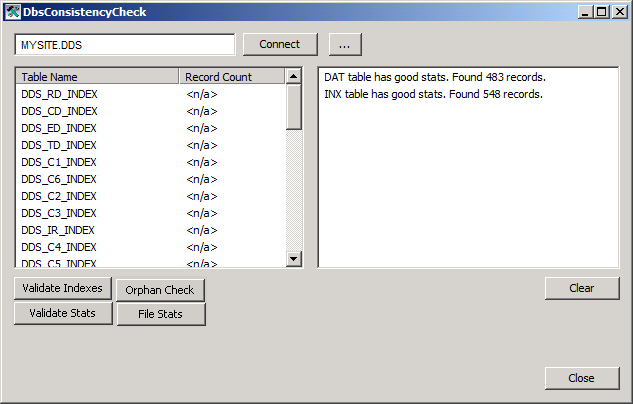
To Perform a Consistency Check
- Make sure the DBS-based service is running.
- Click … to select the service.
- Click Connect to connect to the database.
- Click the desired validation item: Validate Indexes, Validate Stats, Orphan Check, or File Stats described below.
- Click Clear to remove the results.
DBS Consistency Check performs the following items consistency checks:
| Consistency Check | Definition | If Errors Found Run |
|---|---|---|
|
Validates that index records refer to existing database records, and the content of the index matches the content of the database record. |
||
|
Validate Statistics |
Validates that the record counts for each of the database tables and each index is consistent. |
|
|
Validates that all database records that should have an index record have an index record and the content is consistent. |
||
|
File Statistics |
Validates that the overall record counts for all of the indexes and all of the database tables are correct (these are different statistics from those checked by Validate Statistics). |
The DBS Consistency Check utility will retry if it detects that the data has changed while the checks are being performed to avoid reporting false errors, but it will eventually give up after 10 attempts.
Note: Use ESENTUTL to perform physical consistency checks.
Syntax
While the DBS Consistency Check utility has a graphical user interface, it also supports command-line parameters.
DbsConsistencyCheck /domain:xxxx /<logging level parameters>
Parameters
| Parameter | Definition |
|---|---|
|
/domain:xxxx |
Overrides the default domain ID with xxxx. |
|
/<logging level parameters> |
Logging parameters include: /LOG_ALL, /LOG_NONE, /LOG_CONTROL, /LOG_EXCEPTIONS, /LOG_WARNING, /LOG_PROG_STAT, /LOG_MAX_TRACE, and /LOG_ENTER_EXIT. These overwrite the default logging levels of LOG_CONTROL, LOG_WARNING, LOG_PROG_STAT and LOG_EXCEPTIONS. |
Example
|
DbsConsistencyCheck /domain:1234 /LOG_ALL |


